

お店のコメント(スペック情報を含む場合もあり)
内容説明
This book offers a simple to read, fast way to discover all that’s new in Mac OS X Leopard, and how to make the most of it, whether you are new to the Mac, or simply upgrading from a previous version of Mac OS X. New additions to the operating system are showcased, including the changes to the Dock and Finder, and new features such as Stacks, Cover Flow, and Quick View introduced, before the book moves on to give a basic guide to using the Mac—creating folders, moving files, installing applications, and burning CDs, for example. Communication and organization are covered with chapters on Mail and iChat, including information on how to get the most of the latest features such as creating to-do items, and reading RSS feeds in Mail, and sharing screens in iChat. There are chapters that cover Spaces and Time Machine, perhaps the most talked about feature in this release of Mac OS X. iLife is fully dealt with, with discrete chapters on iTunes, iPhoto, iMovie and iDVD, and GarageBand, followed with a chapter on iWeb showing how to share your creations, and using Front Row to be entertained by them. The final chapters of the book give an overview of some more advanced areas of using a Mac, namely how Mac OS X itself works, and also how to develop for the Mac. These chapters are intended only to give a glimpse as to the possibilities—the book is primarily aimed at regular users. A number of appendices conclude the book, one providing a guide to those users who are switching from Windows, and another that contains a useful list of recommended Mac applications for a wide array of uses. In the authors own words ?This book isn’t a bible or tome about how to do anything and everything with Mac OS X, instead its goal is to introduce the major features of Mac OS X so you can be up and running quickly?. Summary of Contents Chapter 1: Mac OS X Leopard’s New Features Chapter 2: Mac Basics Chapter 3: Spotlight Chapter 4: Mail Chapter 5: Safari and iChat Chapter 6: Dashboard Chapter 7: Exposé and Spaces Chapter 8: Time Machine Chapter 9: iCal Chapter 10: iTunes Chapter 11: iPhoto Chapter 12: iMovie and iDVD Chapter 13: GarageBand Chapter 14: iWeb Chapter 15: Boot Camp Chapter 16: Front Row and Photo Booth Chapter 17: Working with Accounts Chapter 18: Networking Your Mac Chapter 19: Mac Security Chapter 20: Under the Hood Chapter 21: Developer Tools Appendix A: Switching from Windows to Mac OS X Software Appendix B: The Mac Apps List
![【クリックでお店のこの商品のページへ】Getting StartED With Mac OS X Leopard [ペーパーバック]](http://ecx.images-amazon.com/images/I/41DzISvxdbL._BO2,204,203,200_PIsitb-sticker-arrow-click,TopRight,35,-76_AA240_SH20_OU09_.jpg)

お店
アマゾン (amazon)

お店の商品コード
1590599292
JANコード
-
メーカー
Justin Williams

商品ジャンル
商品名
最終調査日時
2012/08/18 (Sat) 15:21:04
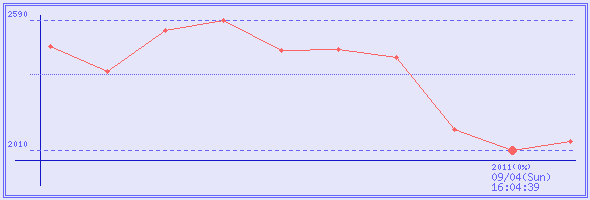
価格の変動(直近3回 : ¥0は未調査回)
取得日時
販売価格
ポイント
実質価格
在庫状態
2012/08/18 (Sat) 15:21:04
¥2,050
0 %
¥2,050
2011/09/04 (Sun) 16:04:39
¥2,010
0 %
¥2,010
2011/05/22 (Sun) 04:48:38
¥2,101
0 %
¥2,101
サイト内キーワード検索
商品名の検索は通常の商品検索ボックスで。
コメントやスペックなどから検索したい場合はこちらから。
コメントやスペックなどから検索したい場合はこちらから。











| 広告 |
|---|